


Please remember that the BetJili app cannot be accessed from two devices simultaneously.
FAQ Type: Technical THB
How can I clear the Betjili APP (Android) cache and app data?
To clear the cache and app data for BetJili, follow these steps:
Step 1: Open the “Settings” menu.
Step 2: Scroll down and select “Apps.”
Step 3: Tap on “Manage Apps” and choose the BetJili app.
Step 4: Click on “Clear Data” and “Clear Cache.”
How do I know if my device is compatible with the Betjili APP (Android)?
You can run the BetJili app on Android 5 and above or play directly from Google Chrome.
What is 1.1.1.1 WARP? Why BetJili Players Can’t Go Without It?

1.1.1.1 WARP: Your Ticket to Unimaginable BetJili Gaming Action
The 1.1.1.1 WARP is a free privacy-focused DNS resolver from Cloudflare designed for a more safe, secure, stable and extremely fast internet connection to everyone. Whether you love the online slots, are a card game lover or a betting enthusiast, the 1.1.1.1 WARP exists to help solve all the potential headaches that might appear while you play game.
1.1.1.1 WARP is BetJili’s Perfect Match
Fellow BetJili platform players can rest assured with the 1.1.1.1 WARP as it helps unlock, keep and make sure everything is okay and runs well. With the 1.1.1.1 WARP, players will unlock:
- Lag-free and buffer-free gameplay all time including the peak hours.
- Have full access to 2000+ games without any issues.
- No restrictions while visiting the BetJili casino platform.
If you stuck on the BetJili platform in any way, experiencing any lags, buffers or internet restriction, the 1.1.1.1 WARP will help you through these issues.
Why The 1.1.1.1 WARP Is Your Best Friend As A Gamer
- The whole setup of the 1.1.1.1 WARP is extremely simple and straightforward to follow
- The data consumption of the WARP is way more efficient than any other VPN service providers
- Helps site work well despite any internet mishaps
- Make sure the security encrypts all personal and payment details.
Final Take
Tired of the BetJili connection failing? This 1.1.1.1 WARP will guard your gameplay. Start making deposits now, head to your favourite games, claim your desired bonuses and chat with the customer support team efficiently with the help of the 1.1.1.1 WARP. If you are ready for non-stop actions, head to our download 1.1.1.1 WARP guide to get started with the download process.
Can I place bets using my phone?
Here’s how you can download and install the BetJili app on your Android.
ID phone:
- Log in to your BetJili account through our website.
- Click on your profile and select “Download” from the menu.
- Tap “Android Download” to start the process.
- Once downloaded, open the file and complete the installation by following the prompts.
When I disconnect from a game, what happens?
If you encounter any issues with your game, please reach out to our 24/7 customer service team via live chat or email. To help us assist you more efficiently, please include the following details in your message:
- Username: Your account username
- Game Description: Brief description of the issue
- Game Name: The name of the game you were playing
- Bet ID: Your unique bet reference number
- Bet Amount: The amount you wagered
- Bet Time: The date and time when you placed the bet
Providing these details will help us resolve your issue as quickly as possible.
How to clear browser cookies and caches?
To clear the cache on your Android device using Chrome, follow these steps:
- Open the Chrome app on your Android phone or tablet.
- Tap the More icon (three vertical dots) at the top right.
- Select History from the menu, then tap on Clear browsing data.
- Choose a time range from the top. For a complete clear, select All time.
- Check the boxes for Cookies, site data and Cached images and files.
- Tap Clear data to finish.
Why aren’t certain games not calculated on my total Turnover?
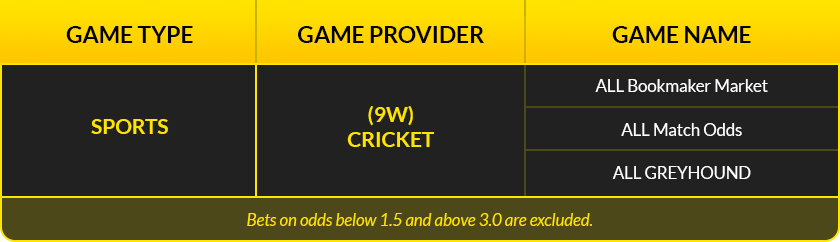
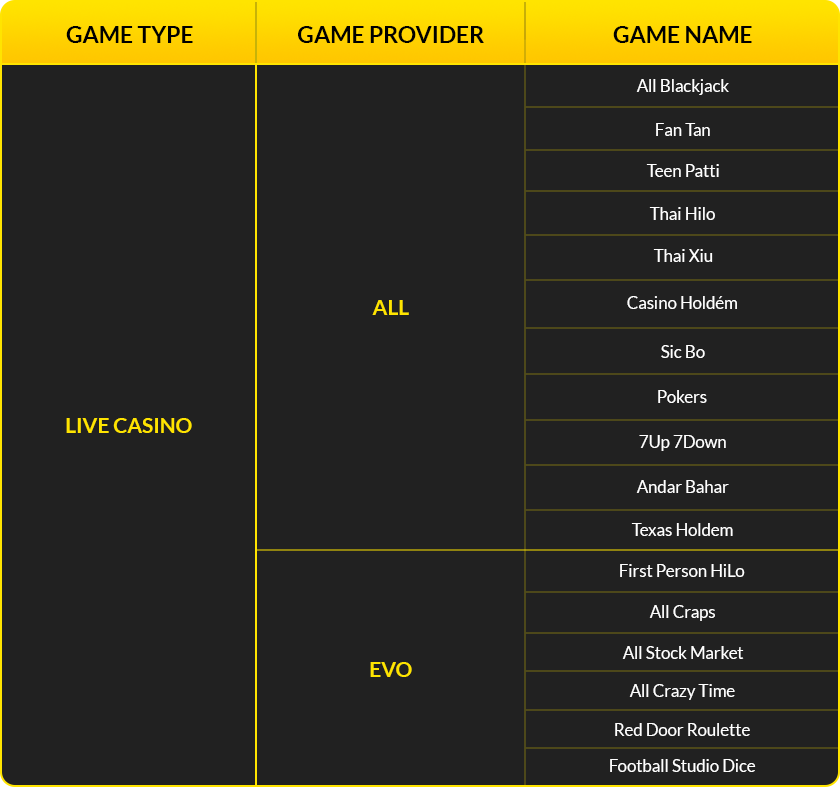
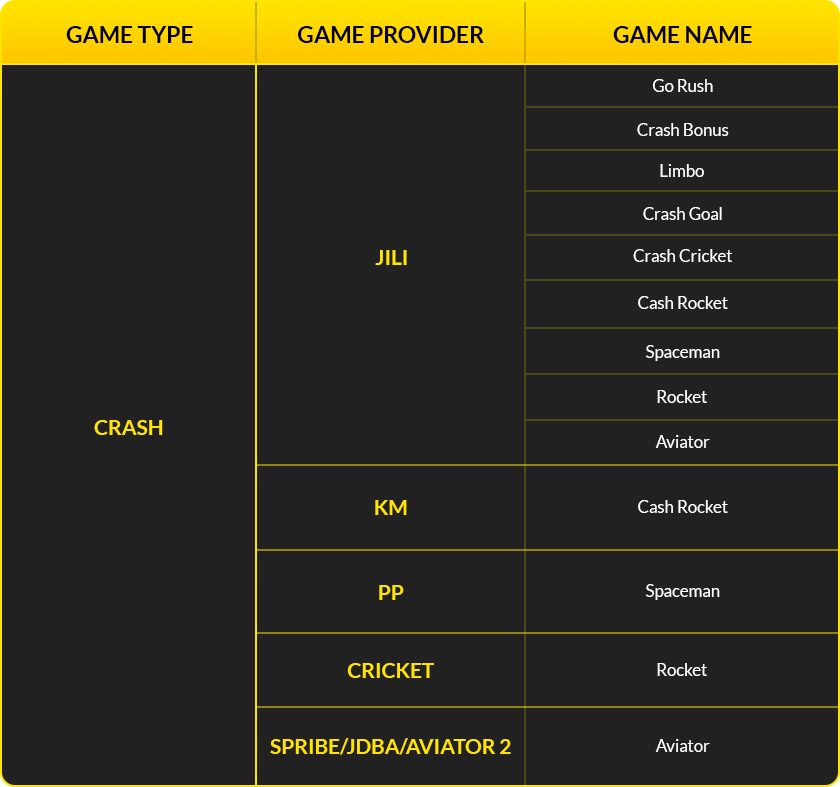
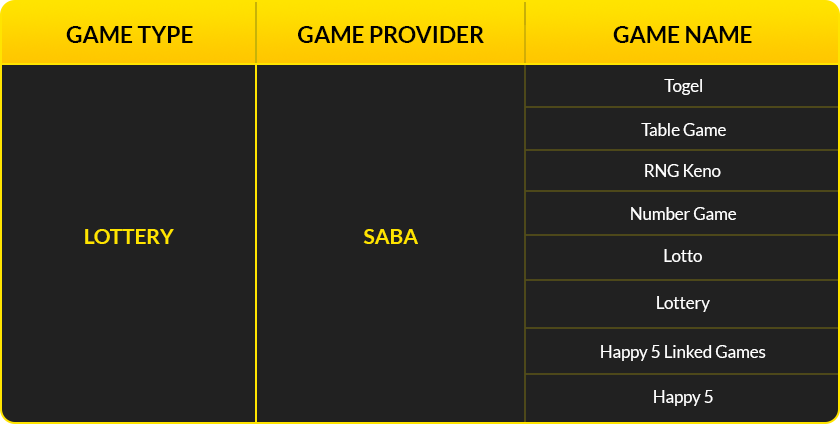
On BetJili, the majority of bets you place can count toward turnover, and bonuses can be used in multiple games. However, there are a few exceptions. In order to stop unfair advantage and preserve integrity, such games are kept out of bonus wagering.
Detailed list of games excluded from bonus wagering:
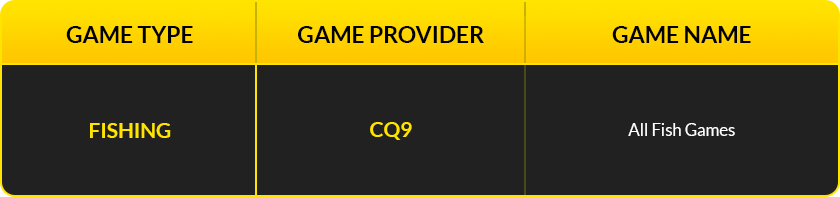
What is the Betjili APP file size?
The BetJili App file size is only around 7.3 MB, and you can easily download it to even phones with low storage capacity.
How do I find my device IP address?
This is how you can find the IP address of your device:
- Find Your IP Address:
- On Mobile/Tablet/PC:
- Open your browser and go to https://whatismyipaddress.com/.
- Your IP address will be displayed at the top of the page.